Installation
Cloning vison from the repository using git
If you don’t have git installed in your system, please follow this link first.
Here we will follow these instructions to clone the repository to your own computer. Follow the link for instructions in other operative systems.
Step-by-step:
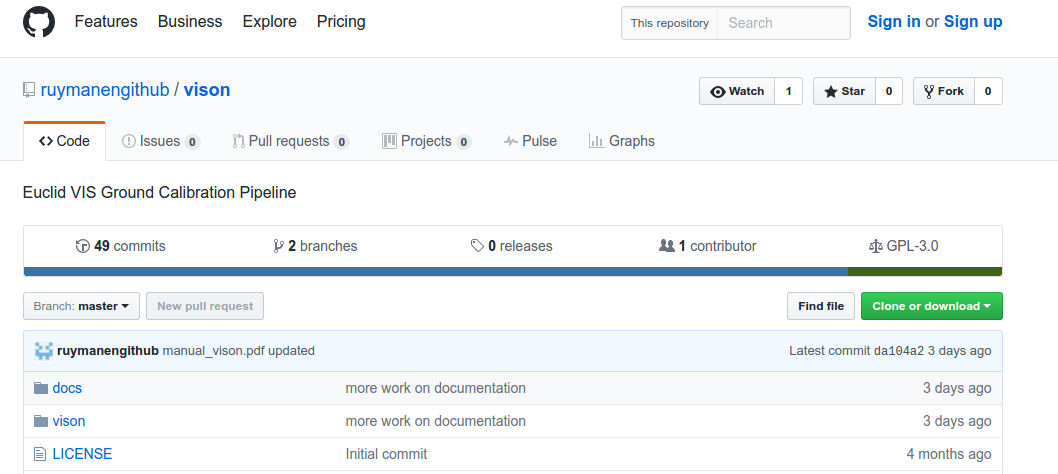
Click on the green “Clone or download” button.
In the Clone with HTTPs section, click to copy the clone URL for the repository.
Open a Terminal.
Change the current working directory to the location where you want the cloned directory to be made.
Type
git clone, and then paste the URL you copied in Step 1.~$ git clone https://github.com/ruymanengithub/vison
Press Enter. Your local clone will be created.
Installation
We recommend installing the code through a conda environment, with a specific list of packages, so you can be sure you have all the needed dependencies.
Note: as of version 1.0 of vison, make sure you use the Python 3.X installer of Anaconda.
First, if you don’t have conda already installed in your system already, follow the instructions in this link.
Installing conda and creating vison environment
Once you have succesfully installed conda, we will create an environment that will allow you to install the pipeline and meet all its dependencies (save for SAO DS9, which is only used in real-time monitoring, optionally).
Step-by-Step:
change directory to your copy of the vison repository:
~$ cd vison
Under the ‘conda’ sub-folder, you will find a yaml file with the description of the environment:
~$ cd conda
~$ ls
vison_1.1.yml
Then execute the following command to create a new conda environment, vison.
- Use the OS version that may correspond in your case (by now, only linux-64 bits version available).
- ::
~$ conda env create -f vison_36.yml
When prompted, type “y” and return to install the listed packages.
Activate the new environment
~$ conda activate vison
Hackity-Hack: installing astromatic_wrapper
One dependency of vison not covered by conda, or pip, (in Python > 3.5) is “astromatic_wrapper”, an apparently no longer-maintained Python wrapper for the tools of astromatic.net. In vison, this package is used to interface with SExtractor (source detection in images). I’ve had to do a little patch (literally one line change) to the code so that it can actually be installed in the Python 3.6 environment used for vison. But you’ll have to install this version of mine manually. It’s not hard, though:
Without deactivating the ‘vison’ conda environment, go to the folder in your system where you install software and do the following to clone the repository of this hacked version of astromatic_wrapper:
~$ git clone https://github.com/ruymanengithub/astromatic_wrapper.git
once done, you’ll have a new folder created under where you executed this last command, named “astromatic_wrapper”. Now:
~$ cd astromatic_wrapper
~$ python setup.py install
- And that should be it. You can check it is installed by trying to import it from the python interpreter:
- ::
~$ python > import astromatic_wrapper > print(astromatic_wrapper.__version__) 0.0.dev260
Installing vison
Finally, to install the vison pipeline itself, we will go back to the folder we downloaded from the github repository:
~$ cd [wherever you pulled vison to...]
~$ ls
conda  docs  LICENSE  manual_vison.pdf  README.md  setup.cfg  setup_distutils.py  setup.py  vison
Then do the actual installation, via:
~$ python setup.py install
Now the vison package will be accessible from anywhere in your system, whenever you start python from within the vison conda environment. For example:
open a new terminal and go to your home directory
~$ cd
activate the vison environment:
~$ conda activate vison
start the python interpreter and import vison:
~$ python
>>> import vison
>>> dir(vison)
['Eyegore', 'FlatFielding', 'Pipe', 'Report', '__all__', '__builtins__', '__doc__', '__file__',
'__name__', '__package__', '__path__', '__version__', '_version', 'analysis', 'blocks', 'dark',
'data', 'datamodel', 'eyegore', 'flat', 'image', 'inject', 'matplotlib', 'ogse', 'ogse_profiles',
'other', 'pipe', 'plot', 'point', 'pump', 'stop', 'support']